 Built with DocStar
How to create multiple companies in Giddh
Giddh allows you to create multiple companies under the same login by adding a new subscription. This is useful when you want to manage accounting for more than one business without creating separate user accounts.
To create another company, log in to your Giddh account and click on the Settings icon available at the top right.
From the Settings menu, open the Subscription section.
.webp)
On Subscription page, you will find the option Add Subscription, which lets you start the process of creating a new company.
.webp)
After clicking on Add Subscription, select the plan you want to use for the new company.
To Opt for Global plan or any other plans click on the flag at the Top right.
To switch to monthly or yearly plan click on the month/year option at the Right.
after choosing the plan click on the “Continue to billing account” (apply the promo code if you have any).
.webp)
Fill in the required billing details. After reviewing the information, click on “continue to review”.

choose a payment provider from the available options.
You can start with a free trial by clicking on Start Trial, or you can directly purchase the plan by clicking on Buy Now. If you need to make any changes to the billing information, you can go back to the billing section before completing the process.

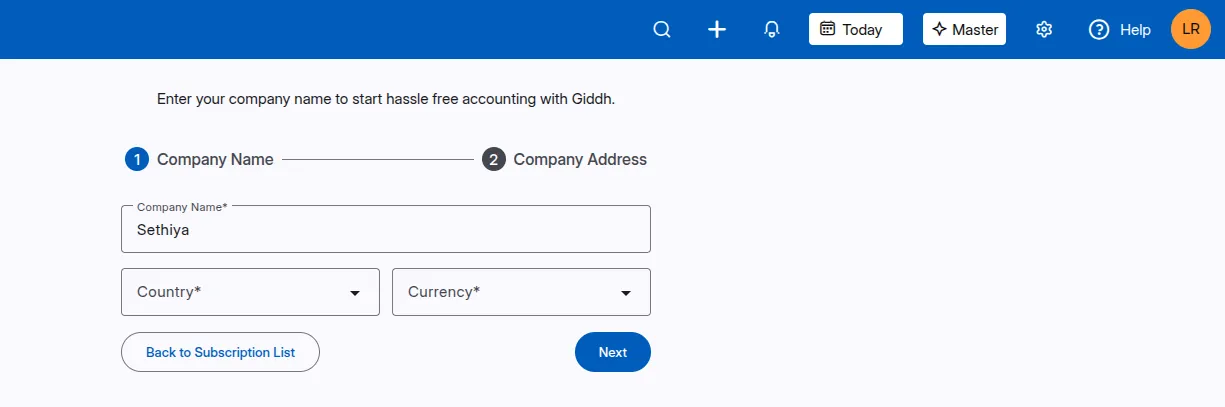
Now you need to provide the Company Name and the following details:
Company Name.
Country
Currency
Click on ‘Next’.
Now you need to provide the Company Address and the following details:
Business Type (Registered with GST or Non Registered)
Business Nature
State
Pincode
Company Address
Business Nature

Congratulations! Your New Company has been created successfully!.


